OpenSCAD is now integrated in NASSCAD
NASSCAD implements OpenSCAD directly in its CAD workspace, using the official OpenSCAD engine compiled to WebAssembly. Edit and render .scad projects, adjust parameters in the Customizer, and measure, combine or export the resulting scene object. The Windows edition bundles the native OpenSCAD engine.
- Official OpenSCAD engine
- Customizer
- MCAD · BOSL2 · BOSL · NopSCADlib
- F5 · F6
- No upload
Then choose Import. Files are read on your computer and never uploaded.
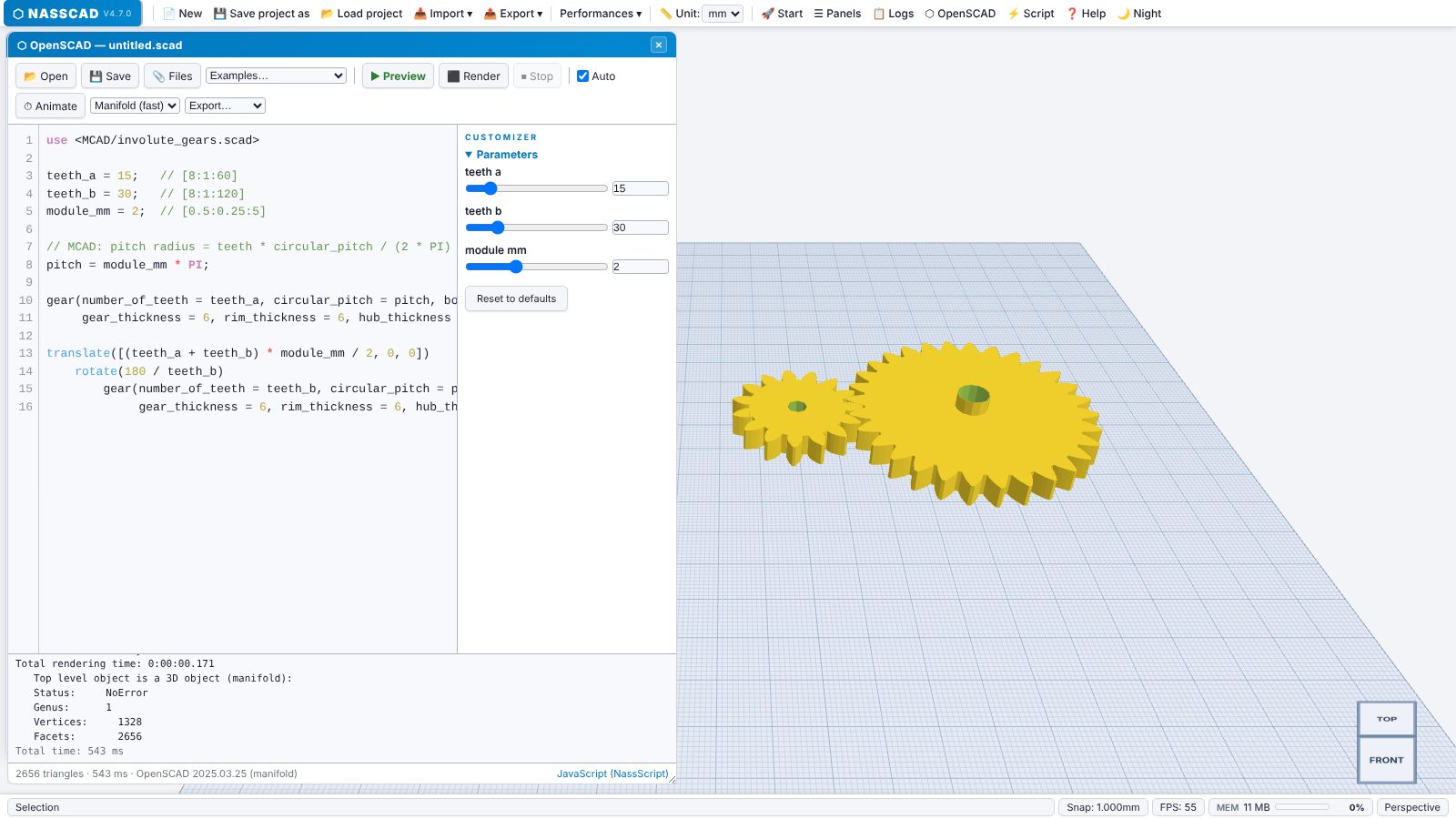
The official OpenSCAD engine, integrated
- The OpenSCAD language itself: modules, functions, list comprehensions,
let,each,assert,$fn,$fa,$fs,$tand$previeware evaluated by the OpenSCAD engine itself. - The same messages: ECHO, WARNING and ERROR lines come straight from OpenSCAD. Click an error to jump to its line.
- The same Customizer: OpenSCAD reads the
// [min:step:max]annotations and the/* [Group] */headings and NASSCAD draws the sliders, lists and check boxes. Parameter sets work as in OpenSCAD: save, switch and delete them, and read or write the same.jsonfile that sits next to the.scad. - The official examples: the Examples list holds OpenSCAD's own Basics, Functions, Advanced, Parametric and Old examples, with their data files.
- Both geometry engines: Manifold (fast) or CGAL.
What NASSCAD adds
- The model becomes a scene object. Select it later and choose Edit OpenSCAD to change the code or the parameters: the object is rebuilt in place.
- Combine it with STEP, IGES or STL parts, measure it, check it inside a printer's build volume, and export it as 3MF, STEP, GLB or any other NASSCAD format.
- OpenSCAD's own exports are one click away too: STL, 3MF with colours, OFF, AMF, and DXF, SVG or PDF for 2D designs.
- Preview with F5:
#parts show as red ghosts and%parts as grey ghosts, as in OpenSCAD's preview. Render with F6. - Animation: the Animate bar drives
$twith a time, a frame rate and a number of steps.
Libraries
MCAD is included, as in the desktop OpenSCAD. BOSL2, BOSL and NopSCADlib are included too: write include <BOSL2/std.scad> and it loads on demand. Add your own libraries and data with 📎 Files, or use Folder to preserve a project’s relative paths. Supported companion files include .scad, imported meshes, DXF/SVG profiles and surface height maps.
Keyboard
| F5 or Ctrl+Enter | Preview |
|---|---|
| F6 or Ctrl+Shift+Enter | Render |
| F4 | Reload and preview |
| F7 | Export as STL |
| Ctrl+S | Save the .scad file |
| Ctrl+D / Ctrl+Shift+D | Comment / uncomment lines |
| Ctrl+/ | Toggle comments |
| Tab / Shift+Tab, Ctrl+I / Ctrl+Shift+I | Indent or unindent |
Cross-checked against native OpenSCAD
The 23 November browser build passed 146 geometry comparisons against native OpenSCAD 2026.07.26 across Manifold and CGAL, plus editor, display and language checks. These results describe the tested corpus; individual projects still depend on browser resources and supported inputs.
What is different from the desktop OpenSCAD
- Version: the engine is the OpenSCAD 2026.07.26 development snapshot, built from OpenSCAD's own sources. The integration targets OpenSCAD language and geometry compatibility, with Manifold and CGAL backends. Experimental features (
roof(),textmetrics()…) stay off, as in OpenSCAD. - Preview: F5 shows the computed geometry with
#and%ghosts, instead of OpenSCAD's OpenCSG drawing. - Fonts:
text()uses the fonts shipped with the engine (Liberation and Noto), not the fonts installed on your computer. - Exports: the engine writes STL, 3MF (with colours), OFF, AMF, DXF, SVG, PDF and CSG — not PNG images; NASSCAD's own exporters add STEP, GLB and the other formats.
- Speed: WebAssembly runs on one core; very heavy CGAL renders are slower than with the desktop application. Manifold keeps most designs fast.
- Deep recursion: a browser gives a web page a small stack, so recursion a few hundred calls deep stops with an error in the browser. The Windows edition runs the engine with a full-size stack and recurses as deep as the desktop OpenSCAD.
Questions people ask
Is it really OpenSCAD?
Yes. NASSCAD runs the official OpenSCAD engine compiled to WebAssembly (version 2026.07.26, GPL-2.0-or-later sources). Parsing, evaluation and geometry are OpenSCAD's own.
Are my .scad files uploaded?
No. The engine runs in your browser tab; your code and files stay on your computer.
Can I use BOSL2?
Yes. BOSL2, BOSL, NopSCADlib and MCAD are included and load when your code uses them.
Does it work offline?
The Windows edition bundles native OpenSCAD 2026.07.26 and works without an internet connection. The hosted browser edition loads the WebAssembly engine and libraries from the site.
Can I make DXF or SVG files for a laser cutter?
Yes. A 2D design (square, circle, polygon, text, offset, projection…) exports straight to DXF, SVG or PDF from the Export list of the OpenSCAD window.