NassLab · Browser AND Windows Desktop · v4.7.0 · Manifold CSG

NASSCAD CAD IN YOUR BROWSER AND ON WINDOWS

STEP · AP203 · AP214 · AP242 · IFC

Free 3D CAD with local model processing and no account required. Create mechanical parts and export STL or 3MF for 3D printing. View and inspect STEP assemblies and IFC building models, with available names, colours and annotations.

i

Choose your edition: launch in your browser with no installation, or get the Windows x64 All-in-One pack — Setup or Portable to work offline with MEDUSA already included. Both desktop editions start and stop the native engine automatically. Browser users can still run the optional standalone MEDUSA engine.

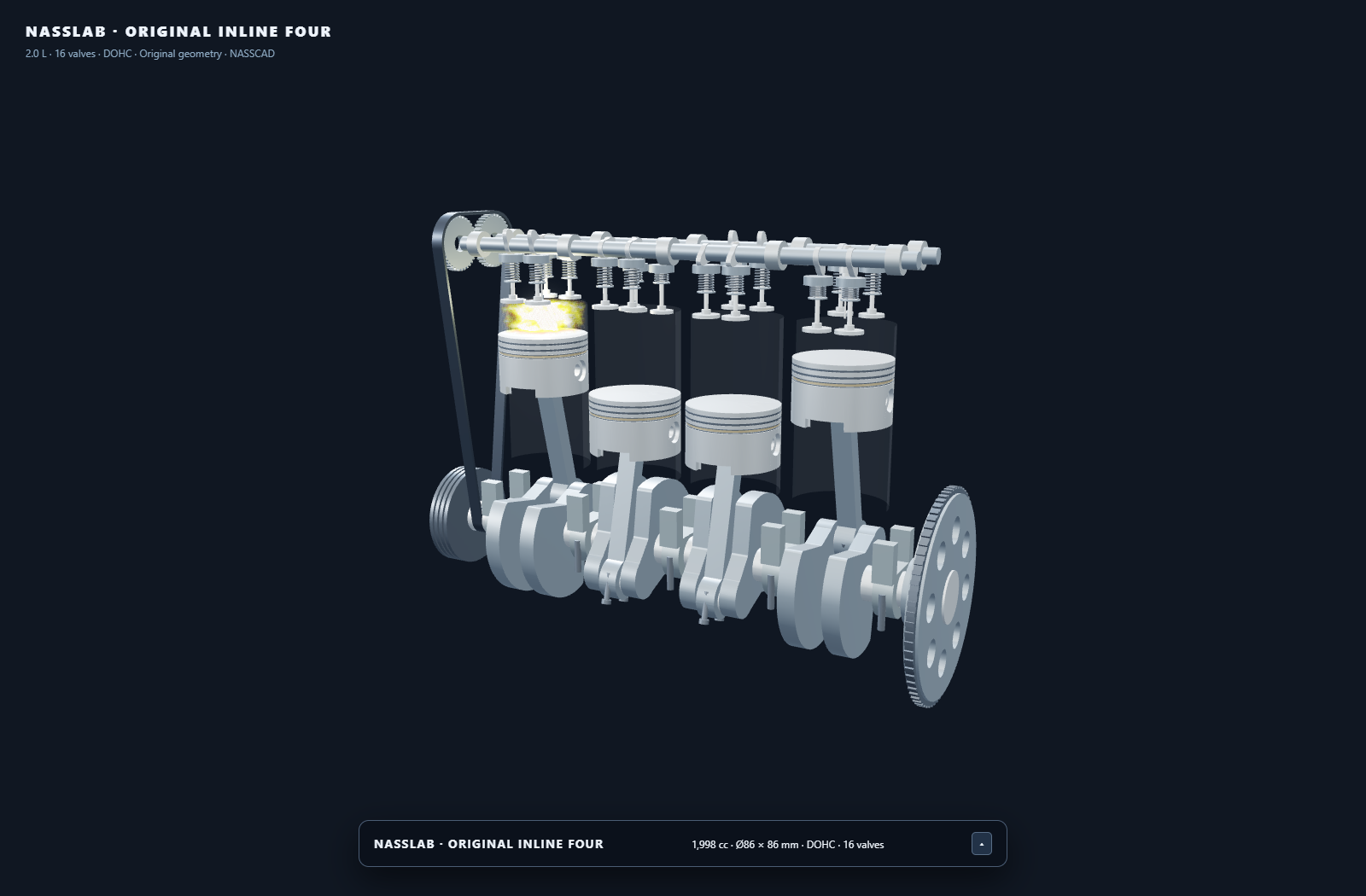
Build 3D scenes with an AI assistant and NassScript. Give a language model the script reference, review its JavaScript, then run it in NASSCAD. See the four-cylinder engine →

Free Education license Browser: no install No account Offline-ready STEP AP203 · AP214 · AP242 IFC · BIM Fillet & chamfer STL · OBJ · 3MF · GLB · PLY Manifold C++ CSG Tree NassScript WebGL
DRAG TO ORBIT · DOUBLE-CLICK TO RESET

NASSCAD v4.7.0 · STEP AP242 B-Rep · NassLab

// What is NASSCAD

Free 3D CAD.
In your browser.

01

A real CAD tool in your browser

A 3D parametric CAD application with an HTML entry point and companion JavaScript and WebAssembly files. No account or installation required. Model processing runs locally; install the Windows desktop edition for offline use.

02

Built for makers and engineers

Designed for people who actually build things — FDM printing, CNC, mechanical assembly. Every primitive, every export format, every workflow decision was made to get from idea to slicer fast.

03

Scriptable from the ground up

NassScript exposes every internal function via an integrated JS console. Automate complex geometries, create procedural parts, chain boolean operations — all in the same window as your model.

// New · Windows x64 desktop edition

NASSCAD MEDUSA.
One All-in-One pack.

The Windows All-in-One pack brings NASSCAD and MEDUSA together in an Electron desktop application. Choose the Setup installer or the Portable executable; both include JavaScript, WebAssembly and runtime DLLs, and work offline on your computer.

01

Choose Setup or Portable

Setup uses an English installer, defaults to all users of this computer, and lets you choose the installation folder and shortcuts. All-user installation requires administrator approval. Prefer no installation? Download Portable and open its executable directly.

02

Open one application

Launch NASSCAD. MEDUSA starts automatically as a separate native process managed by the application. Its status and colored log are accessible inside NASSCAD. There is no BAT launcher and no separate engine to start.

03

Work locally

NASSCAD communicates with its bundled MEDUSA through an internal pipe, without a local HTTP server. Use the native file dialogs to open and save your work. When you close NASSCAD, its MEDUSA process stops automatically.

Windows x64 · NASSCAD 4.7.0 · All-in-One · MEDUSA and dependencies included · No account required.
Setup installs NASSCAD. Portable runs without installation. Both manage MEDUSA automatically.
The browser edition remains available above. The standalone MEDUSA download below is intended for browser users.

// Practical guides

Browser CAD, offline CAD and model viewers.

Download the Windows edition, prepare a printable part, or inspect a received assembly or building model.

Windows download

Download NASSCAD 4.7.0 for Windows x64. Choose Setup or Portable with MEDUSA included, local file dialogs, offline modelling and no account.

CAD for 3D printing

Create a dimensioned mounting block with a through-hole in NASSCAD, save its editable project and export STL or 3MF for your 3D printer slicer.

STEP viewer

View and inspect STEP assemblies in NASSCAD. Open AP203, AP214 and AP242 files, examine available parts, colours and PMI, and understand the export limits.

IFC viewer

View IFC building models locally in NASSCAD. Inspect supported IFC2X3, IFC4 and IFC4X3 geometry, available names and colours, and the limits of IFC export.

// STEP AP203 · AP214 · AP242

STEP assemblies.
View and inspect.

OpenCASCADE and MEDUSA load STEP assemblies for viewing and inspection, with available colours, hierarchy and PMI. Native parallel processing handles large models. Imported bodies may remain open; keep the source file.

📥

STEP Import — AP203 · AP214 · AP242

Multi-body assemblies — names, positions, part and face colors, PMI / GD&T. Thousands of solids: native parallel import with MEDUSA, OpenCASCADE WASM in the browser otherwise.

📤

STEP Export — AP203 · AP214 · AP242

MEDUSA can reuse available referenced source B-Rep. Missing source data or unsupported transformations can require tessellation. Export does not guarantee repair, a closed solid or full preservation of CAD semantics.

🔄

Verify in the Receiving CAD Tool

Keep the original STEP and inspect exported files in the receiving CAD tool. Check dimensions, body count, colours and whether each body is recognised as a closed solid.

⚙️

OpenCASCADE, twice

OCCT compiled to WebAssembly inside the page, and OCCT 8 native inside MEDUSA — the kernel behind FreeCAD, in your browser and on your CPU.

Fusion 360 ✓ FreeCAD ✓ Autodesk Viewer ✓ AP203 · AP214 · AP242
// IFC · BIM

Building models too.
View and inspect IFC.

View an architect's IFC file next to your mechanical parts. IFC4 export remains available for geometry exchange; imported IFC is a viewer workflow, with no guarantee of full BIM round-trip preservation.

01

Open IFC2X3 · IFC4 · IFC4X3

Supported building geometry becomes scene objects with available IFC names, colours and positions. The web-ifc engine processes model data locally. The result is an inspection scene, not an editable authoring model with all BIM relationships preserved.

02

Write IFC4

With the Project › Site › Building › Storey structure strict BIM software expects. Colours are kept face by face.

03

True parametric solids

Cubes, cylinders, tubes, hollow boxes, spheres and cones are written as real IFC solids; everything else as triangulated surfaces.

// Core Features

Everything you need.
Nothing you don't.

Parametric modeling, boolean operations, advanced generators and memory management — in a browser application you can download as a complete offline package.

F-01

Boolean CSG — Manifold C++

Union, subtraction, intersection — powered by Manifold, the open-source C++ CSG kernel developed at Google. It runs right in the browser, compiled to WebAssembly, and switches by itself to the MEDUSA companion engine when it is running — native, multi-threaded with Intel TBB, much faster on big models. Every boolean is logged in a re-runnable CSG tree.

F-02

Advanced Parametric Generators

ISO involute gears & V-groove pulleys (Gear.Gen), hollow curved pipes with Bishop-frame path (Pipe.Gen), parametric screws ISO 68-1 / UNC·UNF (Screw.Gen), parametric nuts ISO 4032/4033 · ASME B18.2.2 (Nut.Gen), ultra-HD torii, chamfered/rounded cubes, solids of revolution, spherical sectors, threaded fasteners.

F-03

Geometry Pool with GC

A 2 GB ArrayBuffer with a custom mark-and-sweep garbage collector handles all geometry and scene snapshots. BVH/AABB caching on every mesh keeps raycasting fast on complex scenes.

F-04

Full Scene Management

Solid/Hole mode per object for automatic boolean detection. Box-select for bulk ops. Live XYZ transform. Dimension annotations in 3D viewport. Project save/load as JSON. Hide any panel you don't need — or all of them with H — and the model gets the whole screen.

F-05

Export Quality Control

STL export uses 128 segments by default — optimized for FDM. Quality slider goes higher for SLA or CNC. Hard-dimensions approach: what you model is what you export, 1:1, no scale surprises. Export the whole design or only the selected shapes, in every format.

F-06

Import STL · OBJ · 3MF · GLB · PLY · STEP · IFC

File picker or drag-and-drop import. Imported meshes are first-class objects — boolean-combinable with native primitives, transformable, and re-exportable into any assembly.

F-07

STEP & IFC — OpenCASCADE + MEDUSA

View and inspect STEP AP203 / AP214 / AP242 assemblies and IFC2X3 / IFC4 / IFC4X3 geometry. Available names, colours and annotations aid inspection. STEP and IFC4 export options remain available; verify the output and retain the source files.

F-08

Real Fillet & Chamfer

True B-Rep fillet and chamfer computed by OpenCASCADE, on picked edges or on all edges at once — not a mesh approximation.

F-09

Build Volume — 28 Printers

Your printer's bed and build volume on the grid — Bambu Lab, Creality, Prusa, Elegoo, Anycubic, Voron, Sovol. A wall turns red when the part sticks out.

// Primitives & Generators

Start fast with
what you need

Core primitives are one click. Advanced generators open a live-preview modal with sliders. 19 watertight primitives total.

Cube Sphere Cylinder Cone Triangular pyramid / Tetrahedron Half-Sphere Tube Roof Arc ⚙ Gear.Gen — ISO Involute ⚙ Gear.Gen — V-Groove Pulley ⌁ Pipe.Gen — Bishop Frame ◎ Torus Ultra-HD ✦ Chamfered / Rounded Cube ⌾ Truncated Cylinder · Double Chamfer ⌀ RevSolid.Gen — Solid of Revolution ◑ ArcSphere.Gen — Spherical Sector 🔩 Screw.Gen — ISO 68-1 / UNC·UNF ⬡ Nut.Gen — ISO 4032/4033 · ASME B18 M Threaded Fastener
// NassScript

From an idea
to a working 3D scene.

NassScript is the bridge between a language model and NASSCAD's live 3D scene. An AI assistant can draft the geometry and motion; you review the code and run it locally. The four-cylinder engine below shows what this programmable workflow can build.

Your idea. An AI assistant. NassScript. NASSCAD.
Share the NassScript reference with your assistant, describe what you want to create, then paste and run the generated JavaScript in NASSCAD. Refine the script as your idea evolves.

The potential goes well beyond a single modelling command. An AI assistant can help combine many tools into a coherent program, define relationships between parts and write the logic that brings a scene to life. Ask for a different dimension, a new mechanism or revised motion, then iterate on the script. NASSCAD provides the modelling tools and execution; NassScript connects them into a programmable workflow.

NassScript four-cylinder engine with pistons, connecting rods, crankshaft, camshafts and a combustion effect

Four-cylinder engine

A complete mechanism built and animated with NassScript: pistons, connecting rods, crankshaft, camshafts, timing belt and combustion effects.

Explore the demo & script →
NassScript Solar System with planets, moons, orbital trails and date and playback controls

Solar System

A date-driven Solar System with planets, moons, orbital trails and interactive playback controls, built and animated with NassScript.

Explore the demo & script →
Read the NassScript reference →

Both demos are also available from the NassScript demo button on the NASSCAD welcome screen.

// In Action

Real parts.
Real complexity.

Real STEP AP242 assemblies, imported straight into a browser tab — thousands of solids, source colors, full assembly tree.

NASSCAD — cruise ship STEP assembly: 2,813 solids imported in 48 seconds
STEP import · Cruise ship assembly · 2,813 solids · 773,669 faces · 48 s
NASSCAD — Scania 8x4 STEP assembly imported in the browser: 1,449 solids, 2.8M faces, 1.9M vertices
STEP import · Scania 8x4 · 1,449 solids · 2,847,613 faces · 2 min 23 s
NASSCAD — Scania V8 XT Turbo STEP import: 1,295 solids, 2.8M faces, source colors preserved
STEP import · Scania V8 XT Turbo · 1,295 solids · source colors preserved · 2 min 6 s
NASSCAD — architectural STEP model: 161 solids, full assembly tree in the browser
STEP import · Architectural model · 161 solids · full assembly tree · 13 s
// Model credits

The assemblies above are third-party CAD models, shown to demonstrate STEP import — they are not NASSCAD content and remain the property of their authors:

Modern Cruise Ship Evita and Rocky House by Christian Spreafico · Scania R620 V8 8x4 and Scania V8 XT Turbo Engine by Ivo Jardim.

All four are published on the GrabCAD Community Library and redistributed as STEP test data by STEP Tools, Inc. No model file is bundled with NASSCAD or hosted on this site.

// Optional companion for the browser edition · Windows x64

Native speed,
when you need it.

NASSCAD Desktop already includes MEDUSA; no separate download is needed. For the browser edition, import, model, combine, measure and export with nothing installed — booleans included, with Manifold compiled to WebAssembly. MEDUSA is the optional companion engine: the same Manifold in native C++ with Intel TBB, on every CPU core, for large booleans. It also imports large STEP assemblies in parallel and can reuse available source B-Rep on export. Imported STEP and IFC remain viewer/inspection workflows. The Windows download now contains a single executable with its DLL dependencies bundled inside: no separate DLL files to copy and no installation required. Start it once and NASSCAD switches to it on its own.

⬇ Download MEDUSA 3.1 — Windows x64 · 21 MB ZIP
1

Download and unzip — anywhere you like.
The ZIP contains one file: Nasscad_Medusa_Engine_3.1.exe, with its DLLs bundled inside. No separate DLLs to copy or install.

2

Run the engine — double-click Nasscad_Medusa_Engine_3.1.exe and leave it running while you use NASSCAD.
It is not code-signed: SmartScreen shows a warning,
click More info → Run anyway.

3

Open NASSCAD — from this site or your own copy.
The CSG panel then reads
ENGINE: MANIFOLD C++ · MEDUSA
instead of MANIFOLD WASM: booleans run natively.

// Education

Education license.
Granted, free of charge.

Schools — secondary, technical and vocational — their teachers and their students, public or private, can use, install, share and adapt NASSCAD free of charge, in class, at home and in paid training. The same goes for apprenticeship and training centres, associations, FabLabs, makerspaces and libraries. No registration, no license request, nothing to sign.

01

Use it in class

Open NASSCAD in any modern browser on the school computers — no account for pupils, no server to run, nothing uploaded. Teach 3D design, STEP, CSG and scripting with the same tool — booleans included, even on locked computers where nothing can be installed. Opened from ClassLink, Clever or Google Classroom, analytics stays off — see Privacy.

02

Install it everywhere

Install NASSCAD Desktop, with MEDUSA included, on each Windows x64 machine. Share it with students so they can work at home, and adapt it to your courses.

03

Students own their work

The models and files students and teachers create with NASSCAD belong to them. The education permission is written in the LICENSE, on top of CC BY-NC 4.0.

Selling NASSCAD or offering it as a paid service requires an agreement with NassLab — contact@nasscad.com.

// Export & Import

From browser to
slicer, CNC, CAD or BIM

Nine export formats. Seven import formats. Dimensions guaranteed 1:1. Section cuts for laser and CNC direct from the viewport. Export the whole design, or only the shapes you selected.

.STL

Binary — Cura, PrusaSlicer,
Bambu, Simplify3D

.STL

ASCII — Human-readable,
text-based format

.OBJ

Wavefront — Blender,
MeshLab, most 3D tools

.3MF

3MF — Bambu Studio,
PrusaSlicer, full metadata

.GLB

Binary GLTF 2.0 — Sketchfab,
Blender, AR/VR, web 3D

.PLY

Stanford PLY — MeshLab,
CloudCompare, scan tools

✂ Section

SVG + DXF — 2D cut at any Y plane.
Laser cutters, CNC, LibreCAD

.STEP

AP203 · AP214 · AP242 — FreeCAD, Fusion 360,
Autodesk Viewer
native OpenCASCADE writer in MEDUSA

.IFC

IFC4 — BIM — Project › Site › Building › Storey,
parametric solids, colors per face

No account. No subscription. No cloud.

A CAD application that runs in your browser and exports parts straight to your printer or CNC.
The tool gets out of the way. You build.

// Documentation

Know your tools.
Build with confidence.

Two complementary guides: learn the NASSCAD interface, or automate your work with NassScript. Both are in English.

NASSCAD user manual

54 PDF pages · 50 chapters · 37 illustrations

An extensive illustrated guide to the graphical interface: selection and the double-click cycle, dimensions, primitives, generators, sketching, boolean operations, fillets, STEP and IFC, project files, exports and MEDUSA.

Includes Windows Setup and Portable instructions, the Performances menu, worked examples, keyboard and mouse controls, and troubleshooting. Read online with chapter search and Day / Night mode, or download the PDF for offline reading.

NassScript reference

Programming reference · Examples · Animated demos

The dedicated guide to scripting and automation: application access, modelling commands, transformations, scene control and JavaScript workflows.

Explore the original four-cylinder engine and real-date Solar System demonstrations, then use the reference to develop your own scripts, including with an AI assistant.

// The NASSCAD approach

A clear purpose. A different approach.

NASSCAD was created to make practical 3D CAD accessible directly in a browser: create mechanical parts, work with STEP assemblies, prepare models for fabrication, and automate modelling with NassScript.

It was never intended to replace or outperform the major players in the CAD industry. It occupies its own place: a free CAD tool with direct access to its tools, local model processing, and an optional native companion engine.

Its dense interface is a deliberate choice. Frequently used tools remain visible and immediately accessible. The integrated help and interactive tutorial guide new users through that interface.

What to know about NASSCAD

Boolean operations work in the browser.
Union, subtraction and intersection use Manifold compiled to WebAssembly. MEDUSA is optional for these operations: it adds native multicore acceleration and additional STEP capabilities. The currently offered MEDUSA download is for Windows x64.
Offline use requires the complete package.
Windows Setup and Portable include NASSCAD, MEDUSA and runtime dependencies. For a separate browser distribution, keep its HTML, JavaScript and WebAssembly files together.
Download size and memory use are different things.
The HTML entry point is approximately 1.25 MB. Its dependencies add to the total download size. Memory use and performance depend on model complexity, mesh resolution and the operations performed.
Different engines serve different purposes.
OpenCASCADE provides STEP and B-Rep capabilities, including fillets and chamfers. Manifold handles mesh boolean operations. web-ifc handles IFC import.
Your models are processed locally.
CAD processing takes place in your browser or in MEDUSA on your own machine. The hosted edition may use Google Analytics for usage statistics; this is separate from model processing. Analytics is disabled when the application is opened as a local copy. Privacy information.
Help and documentation are available.
NASSCAD includes integrated help, an interactive tutorial, an illustrated user manual in HTML and PDF, and a detailed NassScript reference with examples and animated demonstrations. Documentation continues to grow.
An independent project.
NASSCAD is developed and maintained by Nasser / NassLab. Send feedback without an account or email, or write to contact@nasscad.com if you need a reply.