Free involute gear generator
Pick a module and a number of teeth: NASSCAD builds a watertight involute gear with a 20° pressure angle — and its mating gear if you ask for one. Print it, laser-cut it, or send it to another CAD program.
- Involute, 20°
- Module 0.5–8 mm
- Spur · helical · herringbone
- Mating gear
- Pulleys
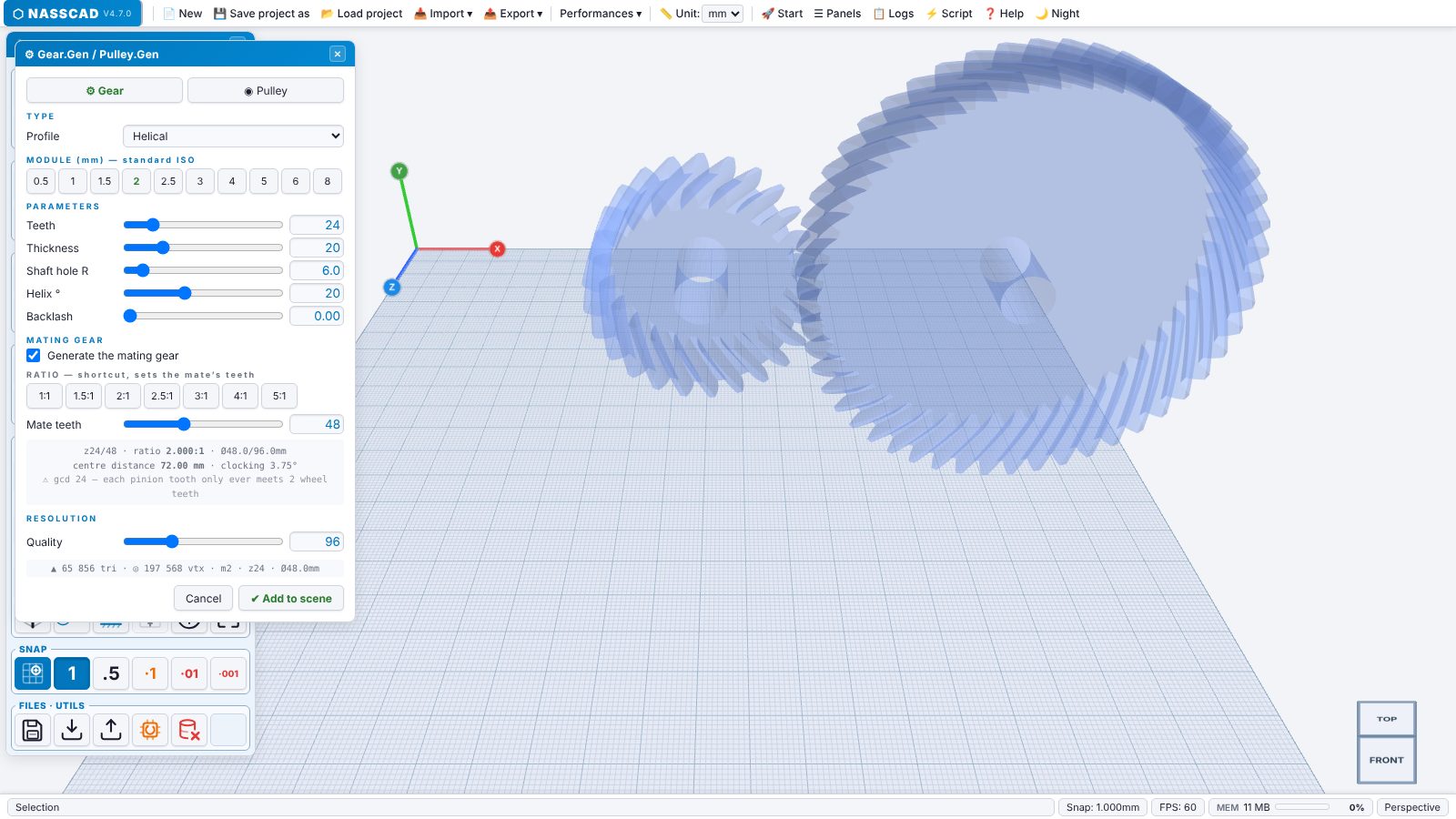
Settings
- Profile
- Straight (spur), helical or herringbone.
- Module
- 0.5, 1, 1.5, 2, 2.5, 3, 4, 5, 6 or 8 mm.
- Teeth
- The number of teeth, z.
- Thickness
- The face width of the gear.
- Shaft hole
- The radius of the bore.
- Helix angle
- For helical and herringbone gears.
- Backlash
- Play between meshing teeth, taken off each flank.
- Mating gear
- A second gear with its own number of teeth, with shortcuts for ratios from 1:1 to 5:1.
- Quality
- Smoother tooth flanks, or lighter files.
Gear maths in one minute
For standard gears without profile shift:
- Pitch diameter: d = m × z
- Outside diameter: da = m × (z + 2)
- Centre distance of a pair: a = m × (z1 + z2) / 2
- Ratio: i = z2 / z1
Example: module 2 with 20 and 40 teeth gives pitch diameters of 40 and 80 mm, a centre distance of 60 mm and a 2:1 reduction.
Spur, helical or herringbone?
- Spur — the simplest to print and to understand, with no axial force.
- Helical — the teeth engage gradually, so they run more quietly, but they push the gear along its shaft.
- Herringbone — two opposite helices cancel that push and keep the pair centred: a favourite for 3D printing.
Pulleys too
Switch the generator to Pulley for a V-groove pulley, with its groove depth and width, or a timing-belt pulley — each with outer diameter, thickness and shaft hole.
Print, cut or export
- Export STL or 3MF for the printer; 3MF keeps the two gears as separate named objects.
- If printed gears bind, add backlash: select the gear, choose Edit .gen params, change it, and the gear is rebuilt.
- For a laser cutter, cut the gear at half its thickness and save the outline as DXF or SVG — see how.
- For another CAD program, export STEP: the teeth are written as faceted geometry.
Questions people ask
Are these true involute gears?
Yes. The tooth flanks follow the involute of the base circle with a 20° pressure angle, after ISO 53, and the gear is a closed, watertight solid.
Can it make bevel, worm or internal gears, or racks?
Not at the moment. The generator makes external spur, helical and herringbone gears, plus V-belt and timing-belt pulleys.
Which module should I use for 3D printing?
Larger modules give larger teeth that forgive printing errors. With a 0.4 mm nozzle, a module of 1 mm or more is a common starting point.
Can I change a gear after creating it?
Yes. Select it and choose Edit .gen params: the generator reopens with its settings.
Is the gear generator free?
Yes, like the rest of NASSCAD, under the AGPLv3 licence. The gears you make are yours.