Free online CAD that runs in your browser
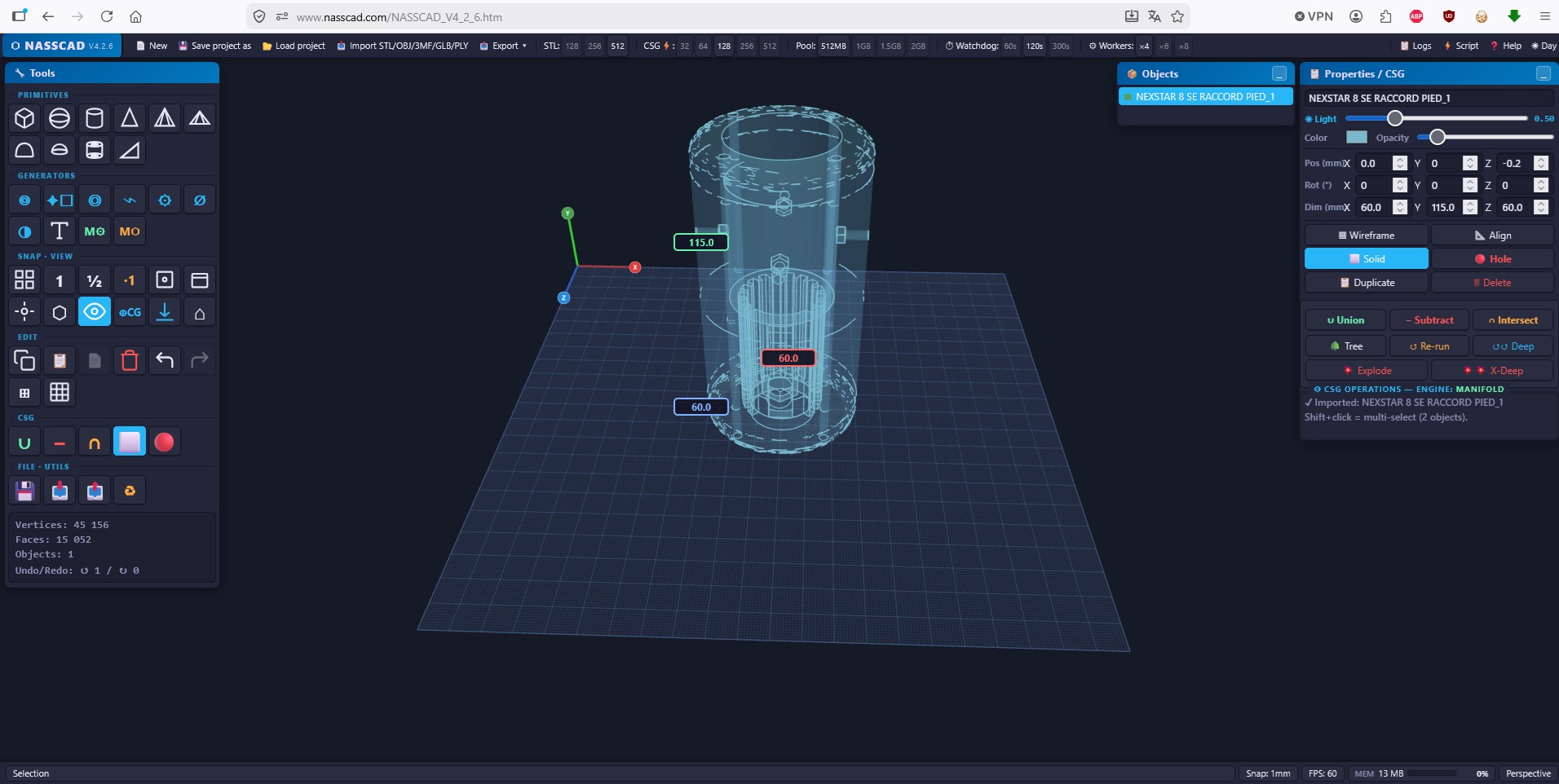
Open a tab and you have a real 3D CAD workspace: shapes, sketches, booleans, fillets, gear and thread generators, STEP and IGES import, STL and 3MF export. It runs on your own computer with WebGL 2 and WebAssembly — nothing to install, no account to create, and your models are never uploaded.
- Free
- Open source (AGPLv3)
- No account
- Nothing uploaded
- Offline on Windows
Then choose Import. Files are read on your computer and never uploaded.
A complete workshop in one tab
Model a part
Start from 19 parametric primitives or a 2D sketch you extrude. Combine shapes with union, subtract and intersect, round edges with fillets and chamfers, and add 3D text in six fonts.
Generate mechanical parts
ISO involute gears (spur, helical, herringbone), V-belt and timing pulleys, metric and imperial bolts and nuts with real threads, and bent pipes. Generated parts keep their parameters for later edits.
Open what others send you
STEP AP203, AP214 and AP242 with assembly folders and colours, IGES sewn back into solids, IFC building models, and STL, OBJ, 3MF, AMF, glTF/GLB, PLY and FBX meshes.
Make it real
Export STL or 3MF for 3D printing and check the part inside the build volume of 28 popular printers. Cut DXF or SVG outlines for a laser cutter. Send STEP or IGES to another CAD system.
Measure and inspect
Click a face or an edge for its diameter, radius, length, area or arc angle. Read AP242 PMI and GD&T when the file carries them. X-Ray makes every part see-through to reveal what hides inside.
Script it
NassScript is a JavaScript console wired to the whole modeller. The four-cylinder engine and the solar-system demos are scripts — see how they work.
How can a CAD application run without a server?
NASSCAD is a web page that brings its own engines: three.js draws the 3D view, OpenCASCADE compiled to WebAssembly reads STEP and IGES and computes exact B-Rep fillets, Manifold performs fast mesh booleans, and web-ifc reads building models. Once the page has loaded, the work happens inside your browser tab, on your processor.
Opening a file means your browser reads it from your disk. Exporting means your browser saves a new file through its Save dialog or its download bar. There is no upload step, no cloud copy and no account. The nasscad.com website counts visits with Google Analytics, which you can switch off (see privacy); your models are never part of it.
Browser or Windows edition?
| Browser | Windows Setup or Portable | |
|---|---|---|
| Installation | None: open the link | Installer, or a portable .exe |
| Internet | Loads from nasscad.com; your files stay on your computer | Works completely offline |
| MEDUSA native engine | Optional companion for Windows | Included and managed automatically |
| Large STEP assemblies | Limited by the browser's memory | Multicore import; files over 200 MB open as separate bodies |
| IGES export | With the MEDUSA companion | Included |
| Price | Free (AGPLv3) | Free (AGPLv3) |
Who uses a browser CAD?
- Teachers and students: free CAD for schools, with no student accounts and analytics off for classrooms.
- Fablabs and makerspaces: one tool for printers, laser cutters and members' files.
- Workshops and factories: open supplier STEP and IGES files without a CAD seat.
- Developers: script 3D models in JavaScript.
- Anyone with a file to open: the STEP viewer, the STL viewer and the file converter.
What NASSCAD is not
NASSCAD is not a constraint-driven, feature-history modeller in the style of SolidWorks or Fusion: there is no timeline of sketches and features to roll back. Imported STEP and IFC models arrive as geometry, without the features of the program that made them. It is designed for a desktop or laptop with a mouse; phones are not the target. As with any exchange, check exported files in the software that will use them.
Questions people ask
Is NASSCAD really free?
Yes. NASSCAD is free software under the GNU AGPL v3. You can use it for personal, school, professional and commercial work at no cost, and what you design with it belongs to you. The licence's source-sharing duties concern people who distribute or host modified versions of NASSCAD itself.
Do I need to create an account?
No. Open the page and start working. Projects are saved as files on your own computer.
Are my files uploaded to a server?
No. Your browser reads the file from your disk and NASSCAD processes it inside the tab. Exports are written straight back to your computer.
Which browsers and computers work?
A recent Chrome, Edge, Firefox or Safari with WebGL 2 and WebAssembly, on a desktop or laptop. Large assemblies need plenty of memory; the Windows edition handles the heaviest files best.
Can it replace a professional CAD system?
For viewing, converting, measuring and making printable or laser-cut parts, often yes. For constraint-driven design with a feature history, drawings and CAM, keep a full CAD system and use NASSCAD alongside it.